Command to verify via Registry setting if UAC (User Account Control) is enabled or disabled:
> REG QUERY HKEY_LOCAL_MACHINE\Software\Microsoft\Windows\CurrentVersion\Policies\System\ /v EnableLUA
EnableLUA REG_DWORD 0×1 = ENABLED
EnableLUA REG_DWORD 0×0 = DISABLED
Source
Showing posts with label command prompt. Show all posts
Showing posts with label command prompt. Show all posts

Aug 29, 2013
How to list the Windows environment variables
In order to obtain a list of all Windows environment variables applicable to your system, run command "set" on Command Prompt.
Source
Source
Aug 28, 2013
How to change the language of the Command Prompt
In order to change the language of the Command Prompt, just click on the application icon to bring up the context menu, then select Properties.
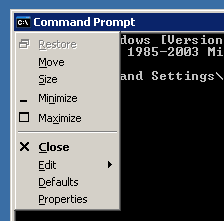
Then go to the Options tab and verify the Current code page menu.
437 - OEM United States is the default.
Source
Then go to the Options tab and verify the Current code page menu.
437 - OEM United States is the default.
Source
Jun 22, 2013
How to start a VMware Workstation VM via Command Prompt
cd "\Program Files\VMware\VMware Workstation"
vmware -x "C:\My virtual machine\winxppro.vmx"
Simple as that.
Source
vmware -x "C:\My virtual machine\winxppro.vmx"
Simple as that.
Source
May 24, 2013
How to launch other programs from the Command Prompt
On Windows, if you need to launch another application while using the Command Prompt all you have to do is use the start command:
start /?
Starts a separate window to run a specified program or command.
START ["title"] [/D path] [/I] [/MIN] [/MAX] [/SEPARATE | /SHARED]
[/LOW | /NORMAL | /HIGH | /REALTIME | /ABOVENORMAL | /BELOWNORMAL]
[/AFFINITY <hex affinity>] [/WAIT] [/B] [command/program]
[parameters]
This is a great way of running scripts that close the prompt that started them, and also starting tasks that need to be monitored separately.
start /?
Starts a separate window to run a specified program or command.
START ["title"] [/D path] [/I] [/MIN] [/MAX] [/SEPARATE | /SHARED]
[/LOW | /NORMAL | /HIGH | /REALTIME | /ABOVENORMAL | /BELOWNORMAL]
[/AFFINITY <hex affinity>] [/WAIT] [/B] [command/program]
[parameters]
This is a great way of running scripts that close the prompt that started them, and also starting tasks that need to be monitored separately.
Mar 5, 2013
How to disable / enable User Account Control (UAC) via command line
Disable UAC
"C:\Windows\System32\cmd.exe /k %windir%\System32\reg.exe ADD HKLM\SOFTWARE\Microsoft\Windows\CurrentVersion\Policies\System /v EnableLUA /t REG_DWORD /d 0 /f"
Enable UAC
"C:\Windows\System32\cmd.exe /k %windir%\System32\reg.exe ADD HKLM\SOFTWARE\Microsoft\Windows\CurrentVersion\Policies\System /v EnableLUA /t REG_DWORD /d 1 /f"
Source
"C:\Windows\System32\cmd.exe /k %windir%\System32\reg.exe ADD HKLM\SOFTWARE\Microsoft\Windows\CurrentVersion\Policies\System /v EnableLUA /t REG_DWORD /d 0 /f"
Enable UAC
"C:\Windows\System32\cmd.exe /k %windir%\System32\reg.exe ADD HKLM\SOFTWARE\Microsoft\Windows\CurrentVersion\Policies\System /v EnableLUA /t REG_DWORD /d 1 /f"
Source
Subscribe to:
Posts (Atom)