Problem: you get an Access Denied error when trying to enable BitLocker on an external HDD or pendrive/flashdrive over a Remote Desktop (RDP) connection.
Fix: Launch the Group Policy Editor (gpedit.msc). Go to Computer Configuration > Administrative Templates > System > Removable Storage Access > All Removable Storage and set Allow direct access in remote sessions to Enabled.
Source

Aug 2, 2016
iOS devices do not appear on iTunes for Windows
Problem: iOS devices do not appear on iTunes under Windows.
Fix: Update device drivers using the files located in "C:\Program Files\Common Files\Apple\Mobile Device Support\Drivers"
Source
Fix: Update device drivers using the files located in "C:\Program Files\Common Files\Apple\Mobile Device Support\Drivers"
Source
Sep 25, 2014
How to check if UAC is enabled or disabled via command line
Command to verify via Registry setting if UAC (User Account Control) is enabled or disabled:
> REG QUERY HKEY_LOCAL_MACHINE\Software\Microsoft\Windows\CurrentVersion\Policies\System\ /v EnableLUA
EnableLUA REG_DWORD 0×1 = ENABLED
EnableLUA REG_DWORD 0×0 = DISABLED
Source
> REG QUERY HKEY_LOCAL_MACHINE\Software\Microsoft\Windows\CurrentVersion\Policies\System\ /v EnableLUA
EnableLUA REG_DWORD 0×1 = ENABLED
EnableLUA REG_DWORD 0×0 = DISABLED
Source
How to reset Notepad++ settings
Notepad++ is great, but it's hard to revert changes to layout and interface configuration.
If you want to reset everything to default settings without reinstalling the program, just delete everything from this directory:
%APPDATA%\Notepad++
When you reopen Notepad++, it will feel like a fresh installation.
Source
If you want to reset everything to default settings without reinstalling the program, just delete everything from this directory:
%APPDATA%\Notepad++
When you reopen Notepad++, it will feel like a fresh installation.
Source
Sep 4, 2014
Error when installing Windows on VMware virtual machine
When you try to install a fairly new or a server edition of Microsoft Windows on a VMware (vSphere, Workstation, Fusion, Player) virtual machine, you might get the following error:
"Windows cannot find the Microsoft Software License Terms. Make sure the installation sources are valid and restart the installation."
This will prevent the installation from taking place and the VM will be in a reboot loop.
The problem is caused by the VMware easy installation feature (when the product identifies the OS you are trying to install based on the installation media and tries to automate the installation wizard).
The solution is simply choosing the "I will install the operating system later." option when creating the VM. After the VM is created, you then edit its properties and load the installation media. The error will go away.
Source
"Windows cannot find the Microsoft Software License Terms. Make sure the installation sources are valid and restart the installation."
This will prevent the installation from taking place and the VM will be in a reboot loop.
The problem is caused by the VMware easy installation feature (when the product identifies the OS you are trying to install based on the installation media and tries to automate the installation wizard).
The solution is simply choosing the "I will install the operating system later." option when creating the VM. After the VM is created, you then edit its properties and load the installation media. The error will go away.
Source
Aug 28, 2014
iCloud Photo Stream stops working on Windows 8.1
Here's a fix for when iCloud Photo Stream stops working on Windows 8.1:
1) Kill these processes if any of them are running:
ApplePhotoStreams.exe
ApplePhotoStreamDownloader.exe
APSDaemon.exe
iCloudServices.exe
iCloud.exe
2) Delete this folder:
%AppData%\Apple Computer\MediaStream
3) Launch iCloud Control Panel. Select the Photos checkbox, and click Apply.
Source
1) Kill these processes if any of them are running:
ApplePhotoStreams.exe
ApplePhotoStreamDownloader.exe
APSDaemon.exe
iCloudServices.exe
iCloud.exe
2) Delete this folder:
%AppData%\Apple Computer\MediaStream
3) Launch iCloud Control Panel. Select the Photos checkbox, and click Apply.
Source
Dec 4, 2013
iTunes for Windows crashes when opening iTunes Store
Problem: running iTunes 11 on Windows 7 or 8 64-bit, it crashes when you try to open the iTunes Store.
Solution:
Run the following command on an elevated Command Prompt or via the Run shortcut by right-clicking the Windows button:
%windir%\System32\rundll32.exe sysdm.cpl,EditEnvironmentVariables
This will launch the Environment Variables window.
Under System variables, select the Path variable, then click on the Edit button.
Type the right arrow key to go to the end of the text box, then add the following to the end of the line:
;%HOMEDRIVE%\%ProgramFiles(x86)%\Common Files\Apple\Apple Application Support
The ";" is to separate the previous path from this new one that you are adding.
Click OK.
Solution:
Run the following command on an elevated Command Prompt or via the Run shortcut by right-clicking the Windows button:
%windir%\System32\rundll32.exe sysdm.cpl,EditEnvironmentVariables
This will launch the Environment Variables window.
Under System variables, select the Path variable, then click on the Edit button.
Type the right arrow key to go to the end of the text box, then add the following to the end of the line:
;%HOMEDRIVE%\%ProgramFiles(x86)%\Common Files\Apple\Apple Application Support
The ";" is to separate the previous path from this new one that you are adding.
Click OK.
Nov 2, 2013
How to rename an Android device
In order to rename an Android device:
1) From within the device itself, change the Device Name under Bluetooth Settings.
2) Connect the phone to a computer using MTP (instead of mass storage) and rename the device.
3) If you want to rename the Wi-Fi hostname, use the Change Hostname app.
Source
1) From within the device itself, change the Device Name under Bluetooth Settings.
2) Connect the phone to a computer using MTP (instead of mass storage) and rename the device.
3) If you want to rename the Wi-Fi hostname, use the Change Hostname app.
Source
How to take a screenshot on Android
In order to take a screeshot on your Android 4.0 and above phone, press the Power and Volume Down buttons simultaneously.
Source
Source
Oct 3, 2013
Troubleshoot Microsoft Office 2013 installation issues
It is very common to run into issues when upgrading from previous versions of Microsoft Office to the 2013 version, including the infamous "Microsoft Office Single Image 2010" error.
Most problems can be solved by running the Program Install and Uninstall Troubleshooter tool.
Source
Most problems can be solved by running the Program Install and Uninstall Troubleshooter tool.
Source
Sep 25, 2013
How to prevent tables from breaking across pages on Microsoft Word
This is a very frustrating thing. By default Microsoft Word will break tables between pages, even if you deselect the "Allow row to break across pages" checkbox under Table Properties > Row.
The solution is to select the entire table, go to the Paragraph section of the Home tab, click the little icon on the bottom right to launch the Paragraph dialog box, go to the Line and Page Breaks tab, then select the "Keep with next" option, then click OK
Source
The solution is to select the entire table, go to the Paragraph section of the Home tab, click the little icon on the bottom right to launch the Paragraph dialog box, go to the Line and Page Breaks tab, then select the "Keep with next" option, then click OK
Source
Sep 19, 2013
How to see the server name on the logon screen of a Windows Server 2008 or higher computer
In order to see the hostname of a Window Server 2008 or higher computer at the logon screen, just type .\ in the User name field.
Anything you type after ".\" is considered a local account.
Anything you type after ".\" is considered a local account.
Sep 12, 2013
How to insert a data validation dropdown list menu from another worksheet on Excel
1) On the worksheet that contains the list, create a range name.
2) On the worksheet where you want to use the list, click Insert > Name > Define.
3) Make sure you can see the range name specified on the other worksheet. Click OK.
4) Select the cells or the entire column or row where you want to insert the dropdown menu, then click Data > Validation.
5) In the Allow box, select List.
6) In the Source box, type =ListName (range name). Click OK.
Source
2) On the worksheet where you want to use the list, click Insert > Name > Define.
3) Make sure you can see the range name specified on the other worksheet. Click OK.
4) Select the cells or the entire column or row where you want to insert the dropdown menu, then click Data > Validation.
5) In the Allow box, select List.
6) In the Source box, type =ListName (range name). Click OK.
Source
How to change or delete range names on Excel
1) On the Insert menu, point to Name, and then click Define.
2) In the Names in workbook list, select the name you want and you are free to delete or change it.
Source
2) In the Names in workbook list, select the name you want and you are free to delete or change it.
Source
Sep 5, 2013
How to change values on drop down menus on Excel
- Click a cell that has data validation settings that you want to change.
- On the Data menu, click Validation.
- On each tab, select and change the options that you want.
Aug 29, 2013
How to list the Windows environment variables
In order to obtain a list of all Windows environment variables applicable to your system, run command "set" on Command Prompt.
Source
Source
Aug 28, 2013
How to change the language of the Command Prompt
In order to change the language of the Command Prompt, just click on the application icon to bring up the context menu, then select Properties.
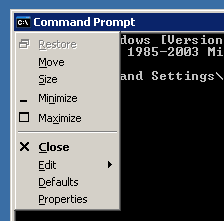
Then go to the Options tab and verify the Current code page menu.
437 - OEM United States is the default.
Source
Then go to the Options tab and verify the Current code page menu.
437 - OEM United States is the default.
Source
How to run Windows PowerShell scripts
The default PowerShell execution policy prevents running any scripts. You need to change it to Unrestricted with the following command:
Set-ExecutionPolicy Unrestricted
Then you can just right-click the .ps1 file and choose Run with PowerShell, or you can run it from within the PowerShell prompt:
PS> cd C:\path_to_my_script\
PS> .\script.ps1
Source
Set-ExecutionPolicy Unrestricted
Then you can just right-click the .ps1 file and choose Run with PowerShell, or you can run it from within the PowerShell prompt:
PS> cd C:\path_to_my_script\
PS> .\script.ps1
Source
Aug 15, 2013
Fix forward slash / interrogation key on Lenovo ThinkPad
Problem: the ?/° key does not work on Lenovo ThinkPad notebooks.
Fix: download and run this registry fix, then reboot the computer.
Registry file contents:
Source
Fix: download and run this registry fix, then reboot the computer.
Registry file contents:
Windows Registry Editor Version 5.00

[HKEY_LOCAL_MACHINE\SYSTEM\CurrentControlSet\Control\Keyboard Layout]
"Scancode Map"=hex:00,00,00,00,00,00,00,00,02,00,00,00,73,00,1d,e0,00,00,00,00
Source
Aug 7, 2013
uTorrent installer does not open / cannot run / will not execute
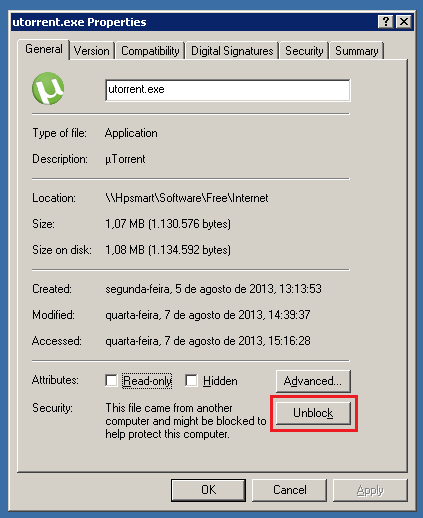
The most recent uTorrent Windows installer (utorrent.exe) cannot be run immediately after the download.
First, you need to unblock the executable by clicking the Unblock button on the file properties page. Then you should be able to execute the installation wizard.
 Source
First, you need to unblock the executable by clicking the Unblock button on the file properties page. Then you should be able to execute the installation wizard.
Subscribe to:
Posts (Atom)