In order to obtain a list of all Windows environment variables applicable to your system, run command "set" on Command Prompt.
Source

Aug 28, 2013
How to change the language of the Command Prompt
In order to change the language of the Command Prompt, just click on the application icon to bring up the context menu, then select Properties.
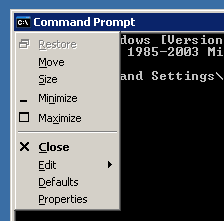
Then go to the Options tab and verify the Current code page menu.
437 - OEM United States is the default.
Source
Then go to the Options tab and verify the Current code page menu.
437 - OEM United States is the default.
Source
How to run Windows PowerShell scripts
The default PowerShell execution policy prevents running any scripts. You need to change it to Unrestricted with the following command:
Set-ExecutionPolicy Unrestricted
Then you can just right-click the .ps1 file and choose Run with PowerShell, or you can run it from within the PowerShell prompt:
PS> cd C:\path_to_my_script\
PS> .\script.ps1
Source
Set-ExecutionPolicy Unrestricted
Then you can just right-click the .ps1 file and choose Run with PowerShell, or you can run it from within the PowerShell prompt:
PS> cd C:\path_to_my_script\
PS> .\script.ps1
Source
Aug 15, 2013
Fix forward slash / interrogation key on Lenovo ThinkPad
Problem: the ?/° key does not work on Lenovo ThinkPad notebooks.
Fix: download and run this registry fix, then reboot the computer.
Registry file contents:
Source
Fix: download and run this registry fix, then reboot the computer.
Registry file contents:
Windows Registry Editor Version 5.00

[HKEY_LOCAL_MACHINE\SYSTEM\CurrentControlSet\Control\Keyboard Layout]
"Scancode Map"=hex:00,00,00,00,00,00,00,00,02,00,00,00,73,00,1d,e0,00,00,00,00
Source
Aug 7, 2013
uTorrent installer does not open / cannot run / will not execute
The most recent uTorrent Windows installer (utorrent.exe) cannot be run immediately after the download.
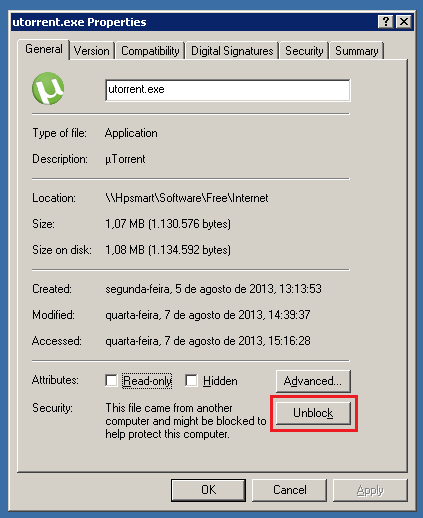
First, you need to unblock the executable by clicking the Unblock button on the file properties page. Then you should be able to execute the installation wizard.
 Source
First, you need to unblock the executable by clicking the Unblock button on the file properties page. Then you should be able to execute the installation wizard.
Jul 12, 2013
iTunes 11 for Windows interface resetting to defaults
Problem: Recently iTunes 11 on my Windows 8 notebook started to show the Welcome screen and reset the interface to defaults whenever I opened it.
Solution: Delete all files in "C:\Users\Username\AppData\Local\Apple Computer\iTunes" and adjust interface settings one last time.
Source
Solution: Delete all files in "C:\Users\Username\AppData\Local\Apple Computer\iTunes" and adjust interface settings one last time.
Source
How to run an offline chkdsk scan on Windows 8
Problem: If you issue the "chkdsk c: /f" command in order to run an offline chkdsk scan on Windows 8, it will accept the command, but when you reboot the computer, chkdsk will not run.
Because of ReFS, you should not need to run an offline chkdsk scan anyway. However, there are times we simply just need to run it to rule out file and file system corruption.
Solution: Disable Fast Startup: Control Panel > Power Options > Choose what the power buttons do > Change settings that are currently unavailable > Disable Turn on fast startup (recommended) > Save changes.
Issue the "chkdsk ,drive_letter>: /f" command and reboot. You should be able to see the offline chkdsk scan progress messages below the Windows (or computer manufacturer) logo while the computer is booting up.
Fast Startup does allow for a faster bootup, so you really should turn it back on when finished with the chkdsk scans :)
Source
Because of ReFS, you should not need to run an offline chkdsk scan anyway. However, there are times we simply just need to run it to rule out file and file system corruption.
Solution: Disable Fast Startup: Control Panel > Power Options > Choose what the power buttons do > Change settings that are currently unavailable > Disable Turn on fast startup (recommended) > Save changes.
Issue the "chkdsk ,drive_letter>: /f" command and reboot. You should be able to see the offline chkdsk scan progress messages below the Windows (or computer manufacturer) logo while the computer is booting up.
Fast Startup does allow for a faster bootup, so you really should turn it back on when finished with the chkdsk scans :)
Source
Subscribe to:
Posts (Atom)